
Native vs Cross-Platform App Development: Which Is Better for Your Product?
Compare native and cross-platform app development based on performance, cost, development speed, user experience, scalability, maintenance and access to device features.
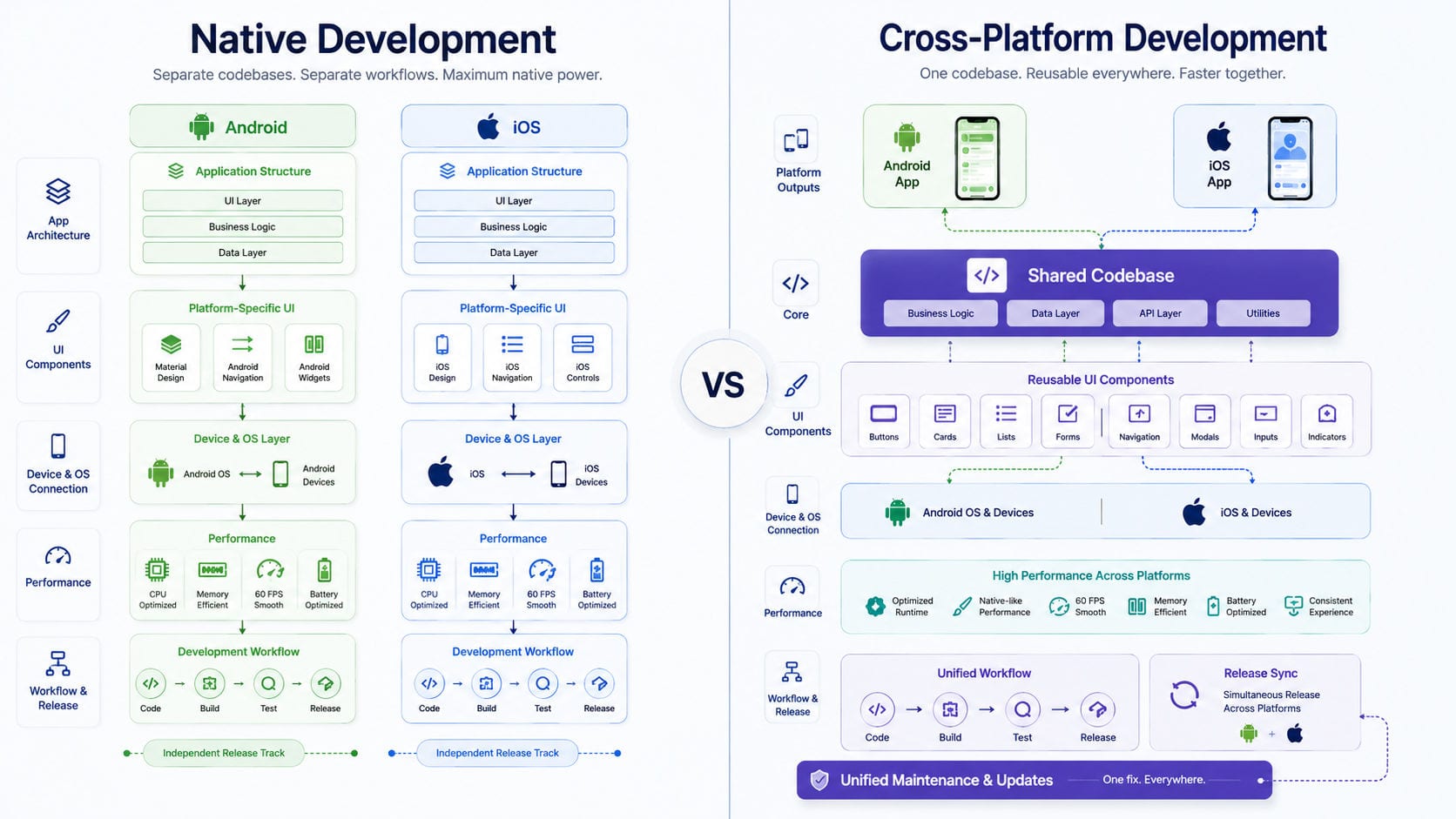
Native vs. Cross-Platform App Development: Which Is Better for Your Product?
Choosing the right mobile application development approach is one of the most critical technical decisions made during the early stages of a digital product. It is not merely a choice between coding languages; it is a strategic decision that directly impacts your capital efficiency, time-to-market, user experience, and long-term systems scalability.
Businesses commonly choose between native app development and cross-platform app development.
Native applications are engineered specifically for an individual operating system, such as Android or iOS. Cross-platform applications leverage a unified codebase to deploy applications across multiple operating systems simultaneously.
Both approaches can produce successful, scalable, and commercially valuable applications. However, they differ in development cost, performance, user experience, maintenance, technical flexibility, and time to market.
The right choice depends on the product’s requirements, target audience, available budget, expected growth, and long-term development strategy.
What Is Native App Development?
Native app development entails building dedicated, standalone applications tailored to a specific operating system.
An Android application is developed using technologies designed for the Android ecosystem, while an iOS application is built using Apple’s native technologies.
Common native development technologies include:
Kotlin for Android
Java for Android
Swift for iOS
Objective-C for legacy iOS applications
Jetpack Compose for modern Android interfaces
SwiftUI for modern iOS interfaces
Native applications communicate directly with the operating system without intermediate translation layers. This allows them to use platform-specific components, APIs, security controls, and device capabilities with zero-latency overhead.
This approach provides deterministic performance and allows the product to align perfectly with the design standards of each platform.
Businesses requiring high-performance, platform-specialized engineering can explore our mobile app development services.
What Is Cross-Platform App Development?
Cross-platform app development utilizes a shared logic layer and rendering engine to build applications for multiple operating systems from a single codebase.
Instead of developing completely separate Android and iOS applications, developers engineer most of the application logic once and deploy it across both supported platforms.
Popular cross-platform technologies include:
Flutter
React Native
.NET MAUI
Kotlin Multiplatform
Ionic
Capacitor
Some platform-specific code may still be required to support advanced device features, integrations, or platform-specific interface behaviors.
However, a significant portion of the application codebase can be shared directly across Android and iOS.
Cross-platform development is often selected by startups and growing businesses that need to launch on multiple platforms while optimizing development time and capital allocation.
Native vs Cross-Platform Development
The fundamental difference lies in how the application is built, compiled, and maintained.
Native development requires engineering and managing separate codebases for Android and iOS.
Cross-platform development allows a single, unified codebase to serve both platforms.
This operational difference influences performance, cost, testing, scalability, interface design, and long-term codebase maintenance.
1. Application Performance
Native applications provide direct access to operating-system performance and hardware capabilities. Because the application compiles to native machine code, it communicates directly with device APIs and system-level libraries.
This direct communication is critical for applications that require:
Complex animations and high-frame-rate rendering
Real-time communication and low latency
Heavy video and audio processing
Large, high-throughput local databases
Background services and system-level tasks
Bluetooth connectivity and IoT communication
GPS tracking and continuous location updates
Augmented reality (AR) and virtual reality (VR)
Advanced camera features and custom image filters
Intensive calculations and mathematical processing
High-performance mobile gaming
Cross-platform frameworks have improved significantly and deliver excellent performance for many business and consumer applications.
For products such as e-commerce apps, booking systems, internal business applications, customer portals, and content platforms, users may not notice a meaningful performance difference.
Performance limitations are more likely to appear when an application requires heavy graphical processing, complex platform-specific background behavior, or continuous, low-latency access to device hardware.
2. Development Cost
Native development requires a larger initial investment because Android and iOS applications require separate development pipelines.
A native project typically requires:
Dedicated Android developers
Dedicated iOS developers
Separate quality assurance (QA) testing processes
Platform-specific user interface adjustments
Independent debugging and bug-fixing processes
Separate release management and App Store/Play Store submissions
Duplicate feature implementation across both codebases
Cross-platform development reduces duplicated effort. A shared codebase allows developers to reuse business logic, networking code, data models, and UI components.
This can significantly reduce development costs, particularly during the launch of the first version of the application.
However, cross-platform development is not automatically inexpensive. Project costs still depend on:
The overall number of features
Backend architecture complexity
User roles and authorization levels
Payment gateway integrations
Real-time functionality
Offline access and local synchronization
Security and compliance requirements
Third-party API integrations
Administrative dashboard development
Testing requirements
Ongoing maintenance
The framework itself does not determine the entire project budget. The overall product scope remains the most important factor in capital allocation.
3. Development Speed
Cross-platform development provides a faster route to launching on Android and iOS simultaneously. Because much of the code is shared, engineering teams do not need to build every feature twice.
This is highly beneficial when a company needs to:
Launch a minimum viable product (MVP) to gather market feedback
Test a business idea in a live environment
Enter the market quickly to preempt competitors
Support both Android and iOS cohorts from day one
Work with a controlled development budget
Release product features consistently across both platforms
Native development takes longer because each application must be written, optimized, and tested separately.
However, this timeline gap narrows when the application contains many platform-specific features. If developers must write separate native modules or significantly different user interfaces for Android and iOS, the expected time savings of a cross-platform approach may be reduced.
4. User Experience
Native applications inherit the interface and interaction standards of their respective operating systems.
Android and iOS users expect different design conventions, including:
Navigation patterns (such as iOS swipe-back vs. Android system back-gestures)
Button styles and states
Menus and action sheets
Gestures and touch feedback
Push notification styling
Permission request interfaces
Form inputs and date pickers
Window animations and transitions
Accessibility features (such as VoiceOver and TalkBack)
A native application uses the standard UI components provided by each platform, ensuring the application feels familiar and intuitive to users.
Cross-platform applications can also deliver high-quality and attractive user experiences. Modern frameworks provide flexible styling engines and allow access to platform-specific UI components when required.
However, product teams must decide whether the application should look identical across Android and iOS or adapt dynamically to the conventions of each platform.
Our UI and UX design services help businesses plan interfaces around product goals, user behavior, and platform requirements before development begins.
5. Access to Device Features
Native development provides direct access to platform-specific APIs and device hardware.
These features include:
Camera and microphone hardware
GPS and location sensors
Bluetooth and BLE (Bluetooth Low Energy)
Biometric sensors (FaceID, TouchID, fingerprint readers)
Push notifications and background services
Contacts list and calendar integration
Local file storage and sandbox systems
Background processing and task scheduling
Health and fitness data sensors
Smart device and IoT integrations
Near-field communication (NFC)
Platform-specific security modules (such as Secure Enclave)
Cross-platform frameworks provide wrappers and libraries for many common device features, which is sufficient for standard business applications.
Challenges may occur when:
A device feature is newly introduced by Apple or Google
The framework plugin is outdated or unsupported
Platform behavior differs significantly between iOS and Android
An advanced hardware integration is required
A suitable cross-platform library is unavailable
The application needs deep operating-system access
In these situations, developers must build custom native modules and connect them to the shared cross-platform application.
6. Code Reusability
Code reuse is one of the main advantages of cross-platform development.
Developers can share:
Core business logic and validation rules
API communication and networking code
Data models and serialization logic
Authentication workflows and token storage
State management systems
Database operations
UI components and layout structures
Error handling and logging systems
Analytics and tracking integrations
This improves development consistency and reduces duplicated development and QA effort.
Native development requires separate codebases for Android and iOS. Although the applications share the same backend APIs and product requirements, the mobile implementation is maintained independently.
While separate codebases provide complete platform control, they require more development resources over the product lifecycle.
7. Maintenance
Cross-platform development can simplify maintenance because many codebase updates are made within a single shared project.
For example, a developer can update business logic once and release the change to both Android and iOS users. This helps keep product features consistent between platforms.
However, maintenance can become complex when the project depends heavily on third-party plugins. Framework upgrades, operating-system updates, and plugin compatibility issues can create maintenance overhead.
Native applications are maintained separately, but each project uses the official technologies and tools of its platform. This provides direct and predictable access to new operating-system features.
The right maintenance approach depends on the quality of the architecture, dependency management, testing processes, and technical support available after launch.
8. Scalability
Both native and cross-platform applications can scale successfully. Application scalability depends on much more than the mobile framework.
Critical factors include:
Backend architecture and server efficiency
Database design and query optimization
API performance and data payloads
Cloud infrastructure and auto-scaling capabilities
Data caching strategies
Security controls and encryption
User authentication and session management
Media storage and Content Delivery Networks (CDNs)
Background processing pipelines
Performance monitoring and logging
CI/CD deployment processes
A poorly designed native application may struggle to scale, while a well-architected cross-platform application can serve a large user base.
Businesses should therefore evaluate the complete platform rather than focusing only on the mobile codebase.
A scalable mobile product requires a secure backend and API development architecture that can support users, payments, notifications, content, and third-party integrations.
9. Backend and API Integration
Most mobile applications depend on backend services. The backend may manage:
User accounts and profiles
Authentication and authorization
Product catalogs and inventory
Orders and transactions
Bookings and scheduling
Payment processing gateways
Real-time messages and chat
Push notifications
Media uploads and hosting
Subscriptions and billing
Business reports and analytics
Administrative controls
Native and cross-platform applications can connect to the same backend APIs.
The choice of mobile framework does not limit whether the application can communicate with a custom backend, payment service, CRM, ERP, or third-party platform.
A properly designed API allows Android, iOS, web, and administrative applications to use the same central data and business logic. This is particularly important when the mobile application is part of a larger custom software platform.
10. Security
Both approaches support secure mobile applications. Security depends on how the application, backend, and infrastructure are designed.
Important security controls include:
Secure authentication (OAuth, multi-factor authentication)
Encrypted data transmission (SSL/TLS pinning)
Token management and storage
Biometric authentication layers
Role-based access control (RBAC)
Secure local storage (Keychain/Encrypted Shared Preferences)
API authorization layers
Session expiration and token rotation
Input validation and sanitization
Activity monitoring and rate limiting
Certificate validation
Protection of sensitive data at rest and in transit
Native development provides direct access to platform security capabilities. Cross-platform frameworks can also use these capabilities through supported libraries or native modules.
The technology choice should be evaluated alongside the sensitivity of the data and the application’s risk profile. Applications handling financial, healthcare, enterprise, or personal data require stronger security planning regardless of the selected framework.
11. Offline Functionality
Some applications must continue working when internet access is unavailable or unstable.
Examples include:
Field-service applications and field inspections
Inventory systems and warehouse management tools
Delivery applications and logistics trackers
Construction and field inspection tools
Travel and navigation applications
Scientific data collection platforms
Internal operational systems
Native and cross-platform applications can both provide offline functionality. The application stores information locally and synchronizes it with the backend when connectivity returns.
Offline support requires planning for:
Local databases (SQLite, Realm, or Hive)
Data conflicts and resolution strategies
Synchronisation protocols and rate limiting
Authentication persistence
Record updates and offline caching
File uploads and queue management
Background synchronization processes
Error recovery and network detection
The quality of offline functionality depends on system architecture rather than whether the application is native or cross-platform.
12. Testing
Native applications require separate testing workflows for Android and iOS.
Each platform may behave differently due to:
Screen sizes and aspect ratios
Operating-system versions and API levels
Hardware capabilities and memory constraints
Permission models and system dialogues
Navigation behaviors and gesture handling
Background-processing rules
Notification delivery systems
Cross-platform applications also require comprehensive testing on both platforms. A shared codebase does not mean that testing can be completed on only one operating system.
The same feature may behave differently on Android and iOS because the underlying devices and operating systems are structurally different.
Testing should cover:
Functional workflows
Interface behavior and UI responsiveness
Device compatibility
Network conditions (3G, 4G, 5G, offline)
Performance and memory usage
Security controls
Accessibility compliance
Notifications and deep linking
Payments and checkout flows
Application updates and data migration
App store release builds
13. Application Store Releases
Native and cross-platform applications must meet the requirements of their respective application stores.
For Android, applications are commonly distributed through Google Play or private enterprise channels. For iOS, applications are commonly distributed through Apple’s App Store or approved enterprise distribution methods.
Both approaches require:
App store listings and metadata
Application icons and assets
Screenshots for multiple device sizes
Privacy policy and data-handling declarations
Permission explanations for sensitive hardware
App store testing accounts
Signed release builds and certificates
Version management and release notes
Review compliance and guidelines checks
Cross-platform development does not eliminate platform-specific store requirements. Each application build must still be prepared, signed, tested, and submitted separately.
14. Team Skills and Availability
The development team’s experience should influence the technology decision.
Native development requires dedicated Android and iOS specialists. Cross-platform development may allow one team to work across both applications.
However, experienced cross-platform developers still need an understanding of:
Android behavior and SDKs
iOS behavior and SDKs
Native build systems (Gradle, Xcode)
Application-store requirements and provisioning
Device permissions configurations
Platform-specific debugging tools
Performance optimization on specific devices
Choosing a framework only because it appears cheaper can create problems when the development team lacks experience maintaining production applications with that technology.
The strongest choice is the one that matches both the product requirements and the team’s technical capability.
15. Long-Term Product Development
A mobile application should be planned beyond its first release.
Businesses should consider whether the product may later require:
Tablet applications (iPadOS/Android tablet optimizations)
Smart TV applications (tvOS/Android TV)
Web applications (desktop and mobile web versions)
Wearable-device support (watchOS/Wear OS)
Advanced Bluetooth integrations
Background location tracking
Media streaming and playback integration
Augmented reality features
Complex animations
Multiple user roles and enterprise portals
Enterprise deployment (MDM solutions)
Offline operations
Cross-platform development provides a strong foundation for products with standard mobile workflows and a need for faster multi-platform delivery.
Native development provides stronger long-term control when the application depends heavily on the capabilities of a specific operating system.
When Is Native Development the Better Choice?
Native app development is the stronger option when:
Maximum application performance is a primary requirement.
The application uses advanced or newly released device hardware.
Platform-specific features are essential to the product's value proposition.
The interface must closely follow each operating system's design guidelines.
Complex background services and resource-intensive tasks are required.
The product includes advanced media processing (audio/video editing).
The application requires high-performance graphics and custom rendering.
The company has dedicated Android and iOS development teams.
Long-term platform control is more important than initial cost.
Examples may include high-performance media applications, advanced financial products, hardware-control applications, gaming products, and applications requiring deep operating-system integration.
When Is Cross-Platform Development the Better Choice?
Cross-platform development is suitable when:
Android and iOS versions must launch together.
The initial development budget is controlled or limited.
Time to market is a critical success factor.
Most features are shared across platforms with minimal custom styling.
The application uses standard mobile functionality (forms, lists, basic camera access, APIs).
The business is launching a Minimum Viable Product (MVP) to test the market.
One team will maintain both applications.
The product requires frequent, synchronized feature releases.
Platform-specific differences are limited.
Examples may include customer portals, booking applications, marketplace apps, internal business tools, e-commerce applications, and service-management platforms.
Businesses planning a multi-platform digital product can explore our complete software and application solutions.
Can a Product Use a Hybrid Approach?
A product does not always need to follow one approach completely.
A cross-platform application can use native modules for selected features. For example, the main interface and business logic may be shared, while native code handles:
Bluetooth device communications
Advanced camera and video processing
Background location tracking
Secure local storage systems
Platform-specific media playback
Biometric authentication setups
A company may also use different technologies for different products within its ecosystem:
A cross-platform customer application
A native Android field application
A web-based administration portal
A shared backend API
The architecture should be selected according to the needs of each product surface.
Questions to Ask Before Choosing
Before selecting native or cross-platform development, ask:
Which operating systems must the application support?
Does the product require advanced device features?
How important is maximum application performance?
Must Android and iOS launch at the same time?
What is the available development budget?
How quickly must the first version be released?
Will the interfaces differ significantly between platforms?
Does the team have native or cross-platform experience?
How frequently will features be released?
Will the product expand to other devices?
What backend and API infrastructure is required?
How long will the application be maintained?
These questions help determine the most practical approach for the product rather than selecting a framework based only on popularity.
Final Decision
Native development provides strong performance, direct platform access, and greater control over platform-specific behavior. It is often the better choice for technically demanding products that rely on advanced hardware capabilities, complex background services, or high-performance interfaces.
Cross-platform development can reduce duplicated work, control initial development cost, and help businesses launch Android and iOS applications more quickly. It is often an effective choice for business applications, marketplaces, booking platforms, customer portals, and minimum viable products.
Neither approach is automatically better for every project. The right decision depends on the application’s functionality, target audience, technical complexity, budget, and long-term product roadmap.
Build the Right Mobile Application for Your Product
Motive Solutions provides mobile app development services for businesses building Android, iOS, and cross-platform digital products.
We combine application development with UI and UX design, scalable backend and API development, and complete custom software development.
Our team evaluates your product requirements, target platforms, integrations, and future roadmap before recommending a native, cross-platform, or hybrid architecture.
Explore our software and application solutions to plan a mobile product that supports your users and long-term business growth.