
How ERP Systems Reduce Manual Work and Improve Business Operations
ERP systems help businesses replace scattered spreadsheets, manual approvals, repeated data entry, and disconnected departments with one centralized platform for operations, finance, sales, staff, reporting, and workflow automation.
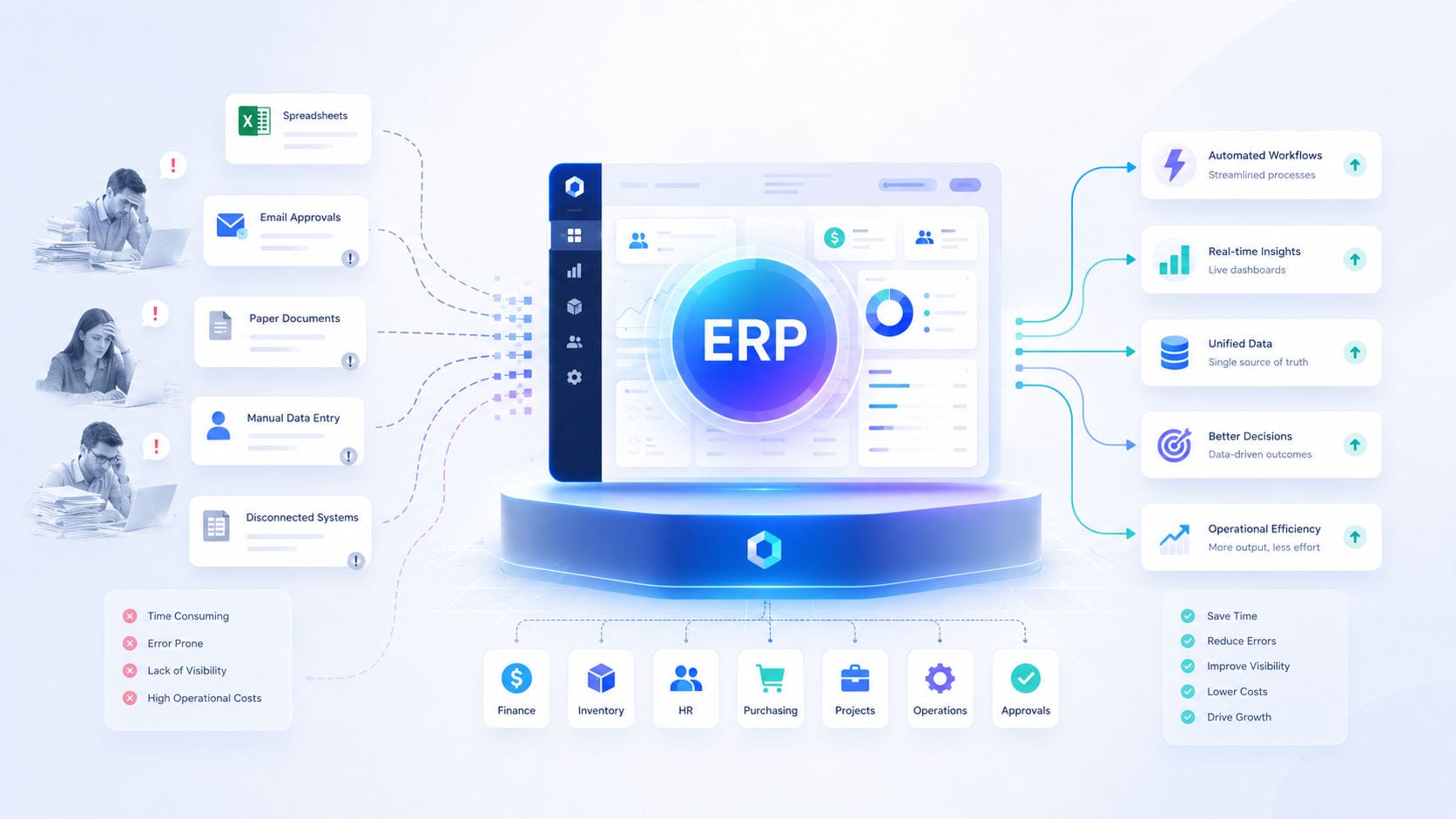
For growing enterprises, operational complexity is the silent killer of productivity. In the early stages of business growth, managing operations across disconnected spreadsheets, WhatsApp threads, isolated email boxes, and standalone accounting software feels manageable. However, as transaction volume scales, this fragmented digital landscape turns into a web of operational pressure, data silos, and administrative delays.
Every manual data entry, repeated copy-paste task, and phone call to verify stock levels represents a leak in your operating margin.
An Enterprise Resource Planning (ERP) system is the architectural solution to this complexity. By unifying your core business operations—sales, inventory, finance, human resources, and customer support—into a single database, an ERP transforms fragmented businesses into highly efficient digital systems.
1. The Real Cost of Disconnected Business Operations
Before understanding how an ERP system reduces manual labor, you must audit the hidden costs of managing a business using disconnected tools (often called "SaaS bloat" or "spreadsheet chaos").
When your systems cannot communicate, your business faces three major bottlenecks:
The Manual Data Entry Loop: Staff must manually copy client names, order details, and values from your website or CRM into invoicing tools, shipping portals, and inventory sheets. This double-entry consumes hours of human labor and introduces typos.
Lack of Real-Time Visibility: If your inventory system is not connected to your sales portal, your sales representatives cannot see true stock levels. They may sell items that are out of stock, leading to refund cycles and lost customer trust.
Delayed Financial Reporting: Business owners cannot get a real-time view of business health. Compiling weekly or monthly performance reports requires staff to manually export CSV files from multiple systems, consolidate them, and resolve conflicting records.
An ERP system acts as a digital nervous system, connecting every department so data moves instantly and accurately.
2. Custom ERP vs. Packaged ERP vs. Disconnected SaaS
Many business leaders hesitate to deploy an ERP because they associate it with multi-million dollar SAP deployments or complex software templates that don't fit their actual workflows.
Here is how custom ERP engineering compares to off-the-shelf software and disconnected SaaS tools:
Comparing Your Strategic Options:
Option 1: Disconnected SaaS (Spreadsheets & Apps)
Data Centralization: None. Data remains scattered across separate tools.
Workflow Fit: Rigid. Your team must adapt to separate app designs.
Licensing Costs: Mid-range per-app subscription fees.
Integration: Relies on fragile third-party connectors (like Zapier).
Scalability: Breaks as user or data volume increases.
Option 2: Off-the-Shelf ERP (SAP / NetSuite)
Data Centralization: Full. But requires highly complex setup.
Workflow Fit: Rigid. Forces you to rewrite your business processes.
Licensing Costs: Extremely high monthly per-user fees.
Integration: Requires expensive certified consultants to build.
Scalability: High, but very expensive to customize.
Option 3: Custom-Engineered ERP (Motive Solutions)
Data Centralization: Full. Tailored directly to your databases.
Workflow Fit: Perfect. Engineered around your exact rules.
Licensing Costs: Zero. You own the codebase.
Integration: Native. Secure APIs built directly into the system.
Scalability: Infinite. Grows modularly as your company scales.
3. How a Unified ERP Automates Your Core Business Modules
A modern ERP system replaces manual data entry by establishing direct API connections between your operational modules. When an event occurs in one department, the database updates all other departments automatically:
The Automated ERP Transaction Workflow:
Sales Intake: A new client order is placed on your frontend portal.
Financial Sync: The ERP instantly generates a PDF invoice and logs it in your ledger.
Inventory Audit: The system deducts stock. If levels drop below safety limits, the purchasing module automatically drafts a supplier purchase order.
Logistics Routing: The logistics module creates shipping labels and assigns the task to the fulfillment team.
Client Notification: The communications module emails tracking details and receipts to the client.
Executive Reporting: The sales values sync with the main executive KPI dashboard in real time.
📦 Inventory & Supply Chain Automation
Manual stock counts are slow and inaccurate. An ERP automates your inventory tracking in real time:
Auto-Reorder Triggers: The second stock levels for a specific item drop below your safety threshold, the ERP drafts a purchase order for your approval.
Barcoding & Tracking: Syncing warehouse scans directly with order fulfillment records to prevent shipping errors.
💰 Finance & Invoicing Automation
Manual billing slows down cash flow. Connecting your sales pipeline to your financial module cuts invoice cycle times to zero:
Immediate Billing: PDF invoices are automatically generated, logged in your ledger, and emailed to clients the moment a milestone is completed.
Accounts Receivable Upkeep: The system monitors payment due dates and automatically emails polite, scheduled reminders to clients with unpaid accounts.
Reconciliation Sync: Connecting directly with banking APIs to reconcile received payments automatically.
👥 Staff Capacity & Project Management
Managing projects via phone calls or spreadsheets leads to missed deadlines. An ERP links task tracking to employee availability:
Smart Resource Allocation: Assigning tasks based on real-time employee workloads and skillsets.
Milestone Alerts: Alerting managers immediately when a critical task is nearing its SLA deadline.
Learn more about our services in Custom Web Platforms.
4. Step-by-Step Blueprint: Transitioning from Spreadsheets to a Custom ERP
Transitioning your business operations to a custom ERP requires a structured engineering approach to prevent operational disruption:
Phase 1: Operational Process Audit
Before writing code, we map out your exact workflows. We identify your manual data entry bottlenecks, database silos, reporting gaps, and internal approval processes.
Phase 2: Modular Database Design
We design a secure, unified database schema that connects all your business data. This ensures that customer profiles, sales leads, inventories, and financial ledgers all use stable, interconnected relationships.
Phase 3: Module Integration & API Building
We build the core ERP modules step-by-step. We start with your primary bottleneck (e.g., automated invoicing or inventory control) and build secure APIs to connect them.
Phase 4: Data Migration & Verification
We migrate your legacy data from old spreadsheets and databases into the new ERP. We run strict automated tests to verify data integrity and prevent any loss of history.
Phase 5: Team Onboarding & Iteration
We run guided onboarding sessions for your staff and collect feedback to refine the user interface, making sure the dashboard is intuitive for daily use.
5. Calculating the ROI of Custom ERP Development
A custom ERP is a strategic investment that delivers measurable financial returns:
Labor Hours Reclaimed: If a team of 10 employees spends 5 hours a week copying data manually, automating that process saves 200+ hours of labor annually—reclaiming capital that can be spent on business growth.
Zero License Inflation: Off-the-shelf ERP systems charge per-user monthly licenses. As your team grows, your software costs skyrocket. A custom ERP has zero licensing fees—allowing you to scale your team without software cost inflation.
Elimination of Operational Errors: Preventing a single double-booking or invoice error can save thousands of dollars in refunds and preserve valuable customer trust.
Ready to design a custom business intelligence system? Unify your operations through our Guided Discovery Intake.
❓ Frequently Asked Questions: Custom ERP Systems
1. What is the difference between a custom ERP and ready-made software like SAP?
Ready-made ERPs are designed to fit every industry, meaning they are bloated with thousands of features you will never use, require expensive monthly per-user licensing fees, and force you to rewrite your business processes to fit their template. A custom ERP is built specifically for your business workflows, contains only the features you need, runs on your own secure servers, and has zero per-user licensing fees.
2. Can we build our ERP modularly, or do we have to build everything at once?
We highly recommend a modular approach. Instead of rebuilding your entire business operations overnight (which introduces risk), we identify your single largest operational bottleneck (e.g., inventory tracking or client invoicing) and build that module first. Once that module is running stably, we build and connect additional modules over time.
3. How does a custom ERP protect our business data?
Because you own the codebase, your data is stored securely on your own cloud servers (e.g., AWS, Google Cloud, or private servers) rather than a third-party database. We engineer multi-layered security protocols, including Role-Based Access Control (RBAC), multi-tenant data isolation, data encryption, rate limiting, and regular automated backup pipelines.
4. Can a custom ERP connect with our existing tools?
Yes. We build custom API connectors to link your new ERP to any tools you want to keep using—such as payment processors (Stripe, PayPal), CRM systems (HubSpot, Salesforce), shipping APIs (DHL, FedEx), email marketing engines, or custom mobile apps.
Secure Your Operational Foundation
If your business is scaling, continuing to rely on scattered spreadsheets and disconnected apps is a high-risk operational strategy. To build a fast, stable, and highly profitable enterprise, you need a unified operational system.
A custom ERP is the technical foundation that turns business complexity into structured, automated growth.
Let's map out your enterprise operations. Draft your custom system requirements with our engineering team through our Guided Discovery Intake or get in touch directly at Motive Solutions Contact.