
Custom ERP vs Ready-Made ERP: Which Is Better for a Growing Business?
Compare custom ERP and ready-made ERP systems based on cost, implementation time, workflow flexibility, integrations, scalability, data control and long-term business value.
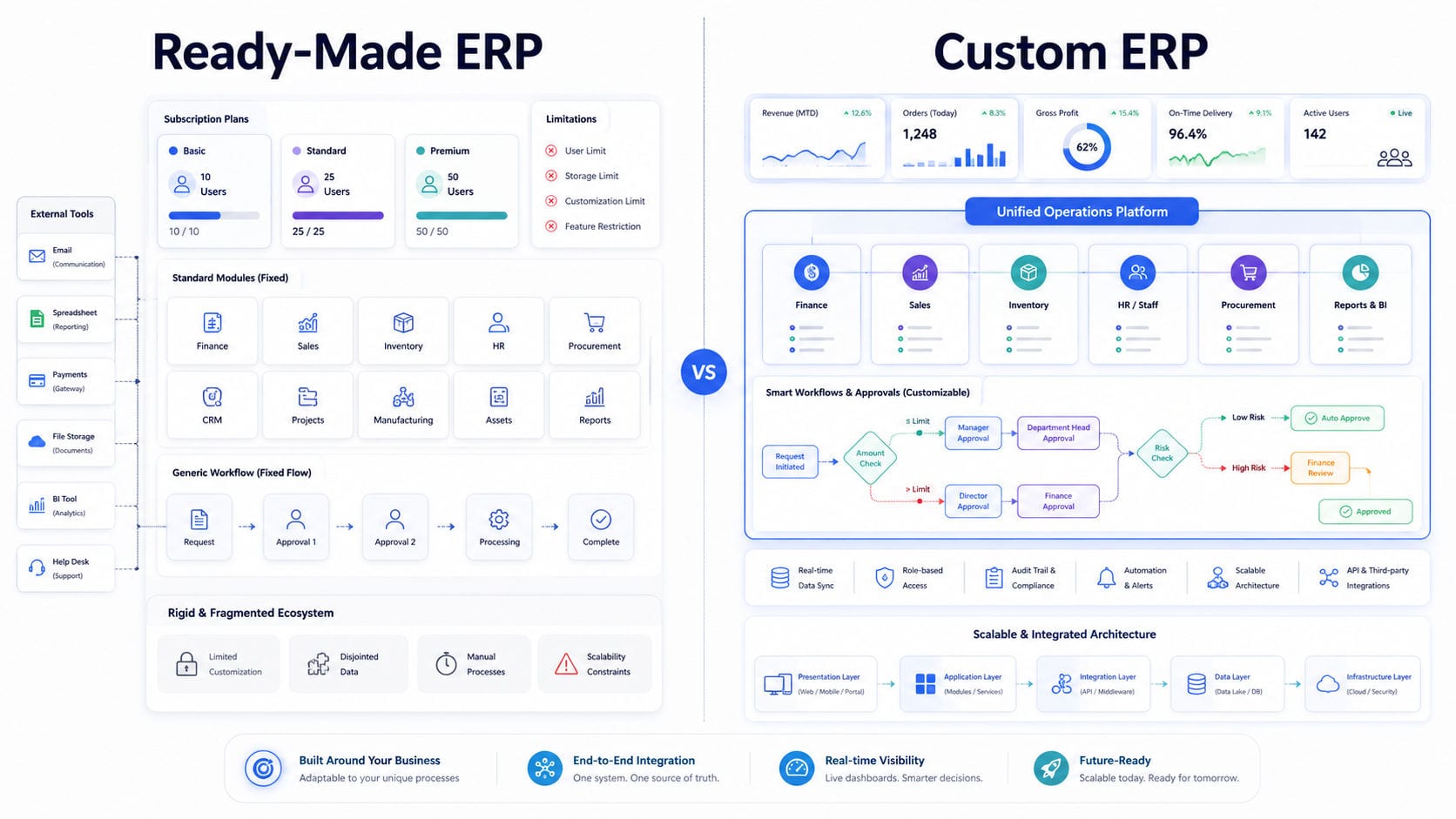
Custom ERP vs Ready-Made ERP: Which Is Better for a Growing Business?
As a business grows, managing operations through spreadsheets, disconnected applications and manual communication becomes increasingly difficult.
Sales teams may maintain separate customer records. Finance may use another system for invoices and payments. Inventory information may exist in spreadsheets, while employees manage tasks and approvals through messages or email.
An enterprise resource planning system brings these activities together. However, businesses must first decide whether to implement a ready-made ERP product or invest in a system designed specifically around their operations.
A ready-made ERP can provide a faster starting point and lower initial cost. A custom ERP offers greater workflow control, flexibility and long-term ownership.
The better choice depends on the complexity of your operations, available budget, implementation timeline, integration requirements and growth strategy.
What Is a Ready-Made ERP System?
A ready-made ERP is a prebuilt software product designed for many businesses.
The provider develops a standard set of modules and offers the system through a software licence, monthly subscription or annual plan.
Common modules may include:
Customer management
Sales and quotations
Purchasing
Inventory
Accounting
Human resources
Payroll
Projects
Reports
User management
Businesses configure the available modules, fields and permissions according to the options provided by the vendor.
This approach works well when a company follows relatively standard processes and does not require extensive workflow customization.
However, the company must normally adapt its operations to the structure of the ERP rather than changing the core platform around its existing processes.
What Is a Custom ERP System?
A custom ERP is designed and developed specifically for one organization.
Its modules, workflows, dashboards, permissions, reports and integrations are planned around the company’s actual operating model.
Through custom CRM and ERP development, a business can create a centralized platform connecting departments such as:
Sales
Finance
Inventory
Procurement
Customer service
Human resources
Projects
Operations
Management
Reporting
A custom ERP can also reflect company-specific rules, including approval levels, document formats, branch structures, staff responsibilities, pricing models and reporting requirements.
Instead of forcing every department to follow a generic system, the ERP is structured around how the organization works.
Custom ERP vs Ready-Made ERP
The main difference is not simply whether one platform has more features.
The real difference is how closely the system can support the company’s operations.
A ready-made ERP provides predefined functionality for many businesses. A custom ERP is engineered around one organization’s workflows, users and long-term strategy.
1. Workflow Compatibility
Ready-made ERP systems are built around common business processes.
They may work effectively for standard activities such as creating customers, issuing invoices, recording purchases and tracking inventory.
Problems can appear when the company has:
Multiple approval levels
Industry-specific processes
Complex pricing rules
Unusual commission structures
Different workflows across branches
Custom document requirements
Specialized customer or supplier relationships
Unique reporting requirements
Employees may then create workarounds outside the ERP.
They may continue using spreadsheets, messages, paper records or separate applications because the standard system cannot support the complete process.
A custom business software platform can reproduce the company’s actual workflow digitally.
Tasks, approvals, status changes, assignments and notifications can follow the same operational structure already used by the business while improving control and visibility.
2. Implementation Time
Ready-made ERP products are usually faster to introduce.
The provider has already developed the main modules, so implementation generally focuses on:
Account configuration
User creation
Module selection
Data import
Permission setup
Basic customization
Staff training
A relatively small organization with straightforward requirements may begin using a ready-made platform quickly.
Custom ERP development takes longer because the system must be planned, designed, developed, tested and deployed.
The timeline depends on:
Number of departments
Number of modules
User roles
Workflow complexity
Required reports
External integrations
Data migration
Web or mobile access
Security requirements
Testing scope
Although the custom approach requires more preparation, the result can provide a closer fit for the company’s long-term operations.
3. Initial Cost
Ready-made ERP systems normally have a lower upfront cost.
Businesses may pay through:
Monthly subscriptions
Annual licences
Per-user charges
Module-based pricing
Setup fees
Training fees
This makes ready-made software attractive to smaller companies that need immediate functionality without financing a complete development project.
A custom ERP requires a larger initial investment because the architecture, interface, database, workflows and features are created specifically for the organization.
The development budget may include:
Business analysis
System architecture
UI/UX design
Backend development
Frontend development
Database development
Integrations
Data migration
Testing
Deployment
Training
Maintenance
The comparison should therefore consider both the initial budget and the long-term cost of ownership.
4. Long-Term Cost
A ready-made ERP may become more expensive as the business grows.
Costs can increase because of:
Additional users
More storage
Premium modules
Multiple branches
Advanced reporting
API access
Integration packages
Customer support plans
Transaction limits
Customization partners
A company may also continue paying for additional software because the ERP does not cover every requirement.
For example, the business might use separate systems for CRM, inventory, project management, reporting and workflow automation.
A custom ERP can combine these functions within one connected platform.
Although ongoing hosting and maintenance remain necessary, the company can reduce its dependence on multiple subscriptions and per-user licence charges.
The strongest financial comparison is usually based on the expected cost over three to five years rather than the first month of implementation.
5. Customization
Ready-made ERP providers usually allow configuration, but complete customization may be limited.
A company may be able to change:
Branding
Form fields
User permissions
Dashboard widgets
Standard reports
Email templates
Notification settings
However, the core workflow and database structure normally remain controlled by the provider.
Deep changes may require expensive extensions, third-party consultants or unsupported modifications.
Custom ERP development provides much greater control.
Businesses can define:
Custom modules
Approval hierarchies
Department workflows
Business rules
Calculation logic
Document formats
User dashboards
Reporting structures
Notifications
Escalation rules
Role-based permissions
This flexibility is especially valuable when a company’s operational process is part of its competitive advantage.
6. Integration With Existing Systems
Most businesses already use several platforms before implementing an ERP.
These may include:
Accounting software
Payment gateways
Banking services
E-commerce platforms
Customer portals
Supplier systems
Shipping services
Email providers
SMS platforms
WhatsApp services
Biometric attendance systems
Industry-specific APIs
A ready-made ERP can only support the integrations offered by its provider or marketplace.
Some integrations may require premium subscriptions or third-party connectors. Others may not be available at all.
A custom ERP can be built around a secure backend and API architecture, allowing it to exchange data directly with the systems the business already uses.
Proper integration can automate actions such as:
Creating invoices after order confirmation
Updating stock after a sale
Recording payments
Sending customer notifications
Synchronizing supplier information
Updating delivery status
Importing attendance records
Generating management reports
This reduces duplicate data entry and improves consistency across departments.
7. Scalability
Ready-made ERP systems scale according to the provider’s plans and technical limits.
Businesses may need to upgrade when they add:
More users
More branches
Higher transaction volumes
Additional modules
Larger databases
More API requests
Advanced reports
The platform may continue supporting growth, but the company remains dependent on the vendor’s pricing and roadmap.
A custom ERP can be designed around expected future requirements.
The architecture may support:
New departments
Additional branches
Multiple companies
Multi-currency transactions
Regional operations
Customer and supplier portals
Mobile applications
Advanced analytics
Automation modules
New API integrations
Scalability still requires good architecture and infrastructure planning. A custom system should not only solve the company’s current problems; it should also provide a stable foundation for future expansion.
8. Data Ownership and Control
With a cloud-based ready-made ERP, company data is generally stored on the provider’s infrastructure.
Businesses may have limited control over:
Hosting location
Database structure
Backup schedules
Data-retention policies
Export formats
Server access
Activity logs
System availability
The provider’s terms determine how the platform stores, processes and exports information.
A custom ERP gives the organization more control over deployment and infrastructure.
The system may be hosted on:
A private server
A virtual private server
A cloud platform
Dedicated infrastructure
The company’s internal environment
The organization can also define its own backup, retention, access and recovery policies.
This level of control can be important for businesses managing sensitive financial, customer, employee or operational data.
9. Reporting and Dashboards
Ready-made ERP systems usually include a collection of standard reports.
These reports may cover sales, expenses, inventory, customers, purchasing and employee activity.
However, every organization measures performance differently.
Management may require reports based on:
Branch
Department
Employee
Product category
Customer type
Supplier
Project
Region
Payment status
Profit margin
Operational stage
A custom ERP can provide dashboards and reports based on the organization’s actual key performance indicators.
With custom dashboard and analytics development, managers can access live operational information without manually combining data from multiple spreadsheets.
Dashboards may show:
Revenue
Outstanding payments
Inventory levels
Active projects
Pending approvals
Staff performance
Customer activity
Supplier balances
Daily operational status
Department performance
The objective is not simply to display more charts. The objective is to give each user the information required to make faster and more accurate decisions.
10. User Experience
Ready-made ERP interfaces are designed to support many industries and users.
This can result in complex menus, unnecessary modules and fields that are not relevant to a particular company.
Employees may struggle to find the actions they use most often.
A custom ERP can provide a role-specific experience.
For example:
Sales employees see leads, customers, quotations and follow-ups.
Finance employees see invoices, payments, expenses and ledgers.
Inventory teams see products, purchases, transfers and stock levels.
Managers see approvals, reports and department performance.
Administrators control users, permissions and system settings.
Removing unnecessary screens can make the platform easier to learn and use.
A well-designed interface also reduces mistakes and improves software adoption across the organization.
11. Security and Permissions
Ready-made ERP products may provide established security controls, authentication and monitoring.
However, the business is limited to the access model offered by the platform.
A custom ERP can implement detailed role-based permissions based on the company’s structure.
Security controls may include:
Department-level access
Branch-level access
Record ownership
Approval authority
Restricted financial data
Activity logs
Multi-factor authentication
Session management
Secure API keys
IP restrictions
Backup and recovery procedures
Different users can be allowed to view, create, update, approve, export or delete specific types of information.
This is particularly valuable when owners, managers, staff, customers, suppliers and partners all use the same system.
12. Updates and Product Direction
The vendor controls the future of a ready-made ERP.
The provider may:
Change the interface
Modify pricing
Remove features
Change usage limits
Discontinue integrations
End support for older modules
Adjust the product roadmap
The business must accept these decisions or migrate to another system.
With a custom ERP, the organization controls development priorities.
New features can be introduced according to:
Operational requirements
Staff feedback
Customer demand
Industry changes
Management strategy
Business expansion
This gives the company greater influence over how the platform evolves.
13. Maintenance and Support
Ready-made ERP subscriptions often include standard product support.
The provider manages hosting, updates and the core application. The level of assistance may depend on the selected plan.
Custom ERP systems require an ongoing maintenance arrangement.
Support may include:
Server monitoring
Security updates
Database maintenance
Bug fixing
Performance optimization
Integration updates
Feature enhancements
Backup management
User support
Infrastructure scaling
A custom ERP should be treated as a long-term business platform rather than a one-time development project.
The organization should plan for continuous maintenance, improvement and technical support after launch.
When Is a Ready-Made ERP the Better Choice?
A ready-made ERP may be suitable when:
The company has standard workflows
The budget is limited
The system is needed quickly
The team is relatively small
Available modules already meet most requirements
Specialized integrations are unnecessary
The company accepts subscription pricing
The business can adapt its workflow to the platform
A smaller organization may benefit from using an established ERP before its operations become complex enough to justify custom development.
When Is a Custom ERP the Better Choice?
A custom ERP may be the stronger option when:
Operations are unique or complex
Departments use disconnected tools
Manual work is increasing
Employees repeatedly enter the same data
Existing ERP products cannot support important workflows
Specialized integrations are required
The company operates multiple branches
Management needs custom reports
Data control is important
The organization expects significant growth
Software is central to business operations
Businesses experiencing these challenges can explore Business ERP & Operations Solutions designed to centralize departments, workflows, reporting and daily operational control.
Can a Business Use a Hybrid Approach?
A company does not always need to replace every ready-made application.
A hybrid approach can combine an existing product with a custom ERP or internal portal.
For example, a business may continue using established accounting software while developing a custom operations platform for sales, inventory, approvals, staff and reporting.
The systems can then exchange information through APIs.
This approach allows the company to keep reliable existing tools while customizing the areas that create the most operational pressure.
The main requirement is proper integration. Employees should not need to enter the same information in multiple systems.
Migrating From a Ready-Made ERP to a Custom ERP
Migration should be carefully planned.
A successful transition normally includes the following stages.
1. Review Existing Processes
Document how each department currently works, including spreadsheets, software applications, approvals and reports.
2. Identify Current Limitations
Determine which processes are slow, duplicated, disconnected or unsupported by the existing ERP.
3. Define the New System
Plan the required modules, user roles, workflows, reports, dashboards and integrations.
4. Clean Existing Data
Remove duplicate, incomplete and outdated records before migration.
5. Develop and Test the Platform
Build the system in phases and test complete workflows with real operational scenarios.
6. Migrate Data
Transfer customers, products, suppliers, transactions, users and other required records.
7. Train Employees
Provide role-specific training so employees understand the new workflow.
8. Launch in Controlled Stages
A phased launch can reduce disruption and allow issues to be resolved before every department begins using the system.
9. Monitor and Improve
Review performance, staff feedback, reports and operational results after launch.
Questions to Ask Before Choosing an ERP
Before making a decision, ask:
Can the system support our complete business workflow?
Which manual processes will remain after implementation?
Will employees still need spreadsheets or separate applications?
Can the platform connect with our existing systems?
How will pricing change as we add users and branches?
Can reports be customized around our KPIs?
Who owns and controls the data?
Can we export all records when required?
How will the system scale over the next five years?
Who will maintain and support the platform?
Can new modules be introduced later?
Does the system support our long-term business strategy?
These questions help businesses compare operational value rather than simply comparing feature lists.
Final Decision
Ready-made ERP systems are suitable for businesses with standard requirements, smaller teams and limited implementation budgets.
They provide a faster route to centralizing basic operations and may be sufficient when the available modules closely match the company’s processes.
Custom ERP systems are better suited to organizations with complex workflows, specialized integrations, multiple departments and long-term growth plans.
They require greater initial investment and more implementation time, but they provide stronger control over workflows, data, integrations, reporting and product direction.
The best ERP is not necessarily the platform with the largest number of features. It is the system that supports employees, connects departments and gives management reliable control over business operations.
Build an ERP Around Your Operations
Motive Solutions provides CRM and ERP development services for growing businesses that need centralized operational control.
We develop custom modules for sales, customers, inventory, procurement, finance, staff, projects, approvals and reporting.
Our team also provides custom software development, secure backend and API integrations, and real-time dashboard and analytics systems.
Explore our [business software solutions](https://motivesolutions.tech/solutions) to discover how a tailored ERP platform can reduce manual work, connect departments and support long-term business growth.