
AI Agents vs AI Chatbots: Which Is Better for Business Automation?
Compare AI agents and AI chatbots based on autonomy, workflow automation, customer support, integrations, cost, security and business use cases to determine which solution fits your organization.
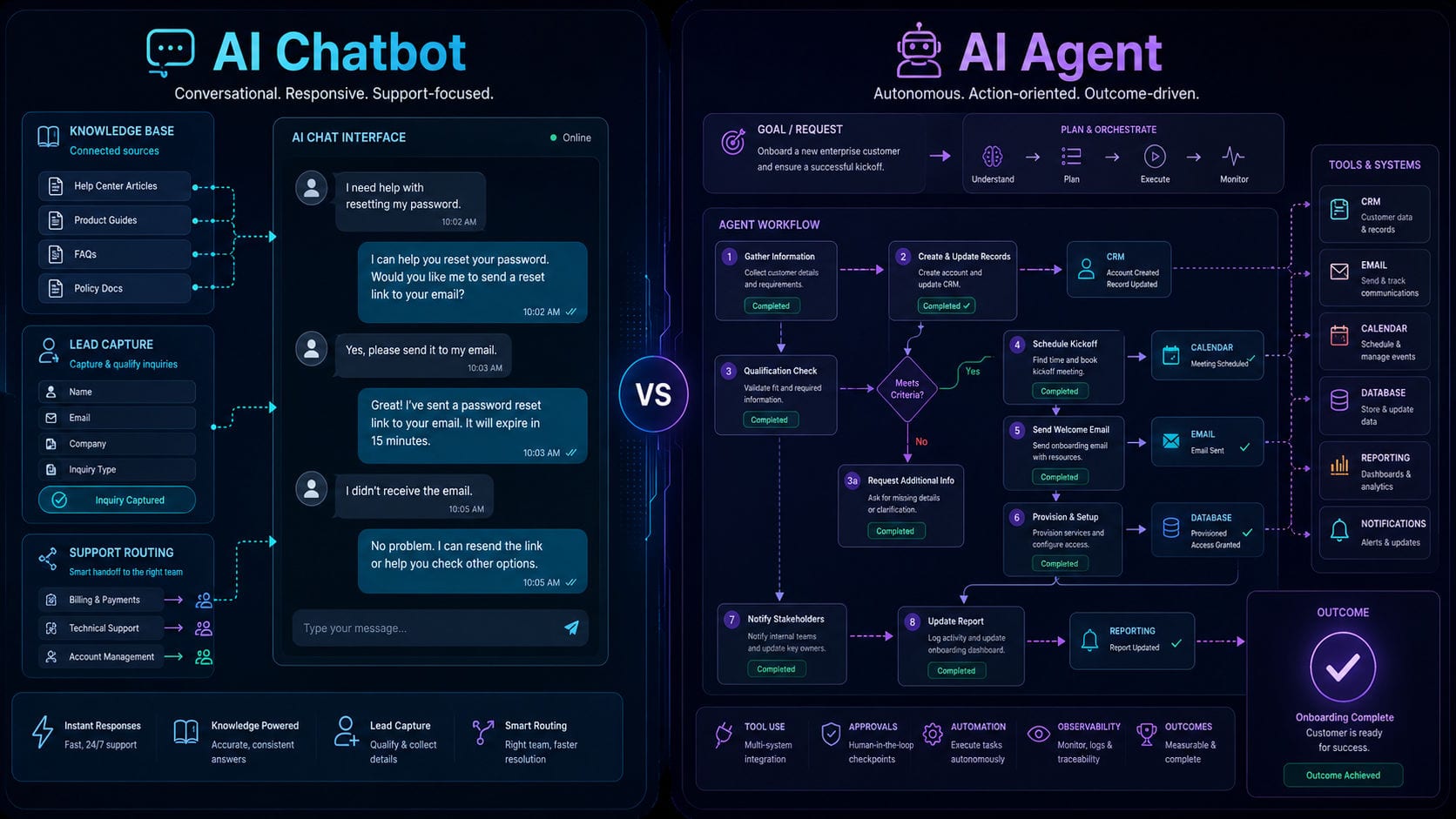
AI Agents vs. AI Chatbots: Which Is Better for Business Automation?
Artificial intelligence is fundamentally transforming how modern enterprises communicate with customers, process operational data, and automate daily workflows.
For several years, businesses have deployed AI chatbots to address customer queries, qualify inbound leads, deliver automated support, and guide users through digital interfaces. Today, AI agents represent the next stage of this technological evolution.
Rather than merely responding to user inputs, an AI agent operates toward a defined business objective. It coordinates connected software tools, processes contextual data, makes decisions within set parameters, and executes multi-step workflows across independent systems.
This raises a critical question for technology and operations leaders: Should your organization deploy a conversational AI chatbot, engineer a goal-oriented AI agent, or combine both approaches into a unified system?
The optimal choice depends on the specific business problem, the required level of automation, the depth of system integrations, data compliance mandates, budget parameters, and the degree of human oversight required.
To design and deploy a solution aligned with your actual operational workflows, explore our professional AI and business automation services.
What Is an AI Chatbot?
An AI chatbot is a conversational interface designed to communicate with users through natural language text or voice.
Its primary role is to receive an input, analyze the user's intent, retrieve matching information from an approved repository, and return a contextually relevant response.
AI chatbots are commonly deployed across:
Public corporate websites
Native mobile applications
Client-facing portals
Enterprise messaging applications (e.g., Slack, Teams)
Internal knowledge bases
Social media and communication channels
Automated customer support desks
Interactive voice response (IVR) systems
Traditional chatbots rely on pre-programmed decision trees or rigid, rules-based scripts where users select from defined paths, such as:
Track an order shipment
View product pricing tiers
Connect with customer support
Book a consultation
Request a service quote
Modern AI chatbots leverage Large Language Models (LLMs) and vector databases (Retrieval-Augmented Generation, or RAG) to process complex questions and generate dynamic, natural responses. They excel at answering questions about product catalogs, company policies, and technical documentation. However, their core function remains focused on communication and information delivery.
What Is an AI Agent?
An AI agent is an autonomous software system engineered to pursue a specific goal and execute workflows on behalf of a user or business.
Upon receiving an objective, the agent decomposes it into a logical sequence of sub-tasks, evaluates which digital tools are required, calls APIs to retrieve data, executes actions, and monitors the outcome until the goal is achieved.
For example, while a chatbot can explain the steps to reschedule an appointment, an AI agent executes the entire process:
Authenticates the user's account credentials.
Queries the booking database to retrieve the active appointment.
Checks real-time calendar availability for the requested time.
Validates the request against scheduling policies.
Updates the database record to confirm the new booking.
Sends email and SMS confirmations to the user.
Logs the interaction details in the corporate CRM.
AI agents interact with:
CRM databases and ERP platforms
Cloud databases and data warehouses
Communication channels (Email, SMS, messaging APIs)
Scheduling and calendar systems
Payment gateways and processing pipelines
Inventory management systems
Support ticketing platforms
Analytics and reporting dashboards
Internal microservices and APIs
Third-party web services
AI agents vary in complexity, ranging from single-task systems to multi-agent networks that coordinate complex business processes. The most effective enterprise agents operate within strict permissions, data boundaries, and human-in-the-loop approval workflows.
AI Agent vs. AI Chatbot: The Transition From Conversation to Action
The difference between the two lies in the transition from conversational engagement to task execution.
AI Chatbots are conversational systems that respond to user queries.
AI Agents are action-oriented systems that execute the steps required to achieve a business goal.
A chatbot explains the refund policy; an agent validates the transaction history, verifies the return shipping status, processes the refund through the payment gateway, updates the ERP, and alerts the accounting team.
However, these technologies can overlap. A modern customer-facing chatbot can trigger agentic workflows behind the scenes, and an autonomous agent can use a chat interface to ask users for clarification or approval.
Your architectural decision should focus on the specific capabilities your workflows require rather than the technology label.
1. Primary Purpose
AI Chatbots
The primary purpose of a chatbot is to facilitate natural language communication. It helps users retrieve information, navigate systems, or resolve common inquiries.
Answering frequently asked questions (FAQs).
Presenting product and service details.
Capturing inbound lead data.
Qualifying prospects based on standard questions.
Guiding users through form completions.
Providing initial customer support.
Querying internal documentation.
Routing requests to the appropriate business unit.
AI Agents
The primary purpose of an agent is task execution. It orchestrates systems to complete workflows without manual intervention.
Writing, updating, and deleting database records.
Synchronizing data across different software platforms.
Analyzing unstructured inputs to determine next actions.
Orchestrating multi-step operational workflows.
Generating invoices, contracts, and business documents.
Automating scheduling and calendar management.
Triggering event-based notifications.
Monitoring system statuses and handling exceptions.
Generating and distributing performance reports.
2. Level of Autonomy
AI Chatbots
Chatbots operate with low autonomy. They are reactive, waiting for user input and responding to individual messages within a single conversational session. Once the information is delivered, the interaction ends.
AI Agents
Agents operate with high autonomy. Once given a goal, they run independently in the background, executing task plans, selecting APIs, handling errors, and verifying results.
This autonomy requires guardrails. To protect system integrity, enterprise agents must operate within:
Role-based user permissions.
Pre-defined financial and transactional limits.
Restricted API scopes.
Strict data access and compliance policies.
Structured validation rules.
Real-time audit logs.
Human-in-the-loop escalation paths.
3. Workflow Complexity
AI Chatbots
Chatbots handle linear, conversational workflows:
Receive a question.
Identify user intent.
Retrieve matching information from a database.
Deliver the response.
Escalate to a human agent if unresolved.
AI Agents
Agents manage complex, multi-step workflows. For example, a sales lead agent can:
Parse an incoming inquiry email.
Identify the requested service and company profile.
Qualify the lead using custom business rules.
Query the CRM to check for duplicate accounts.
Create a new lead record and assign it to a sales representative.
Draft a personalized follow-up email.
Schedule a follow-up task in the representative's calendar.
Send an internal notification via Slack.
Update the lead status in the CRM.
This requires deep system integrations, data access, and structured action execution.
4. Business System Integrations
AI Chatbots
Chatbots can run with minimal system integration. A public website chatbot, for example, can answer queries using a standalone vector database without accessing your internal systems.
AI Agents
Agents require deep integrations to perform actions. They must connect with databases, ERPs, and APIs.
Building these systems requires a secure backend and API development architecture to control:
The data fields the agent can read or write.
The functions the agent can trigger.
The validation rules for inputs and outputs.
Authentication and security protocols.
Detailed audit logs of all agent actions.
Error handling and fallback processes.
5. Memory and Context
AI Chatbots
Chatbots typically rely on session memory, retaining the context of a conversation only until the chat is closed. Advanced implementations can store summaries or retrieve basic customer profiles to add context to future chats.
AI Agents
Agents require persistent, long-term memory to manage workflows over time. They must track:
Historical customer transactions and interactions.
The current status of long-running workflows.
Completed and pending tasks.
Awaiting human approvals.
Prior system errors and resolution steps.
User preferences and custom business rules.
This memory must comply with data privacy regulations (e.g., GDPR, CCPA). Your architecture must control what data is stored, how long it is retained, and how sensitive information is protected.
6. Decision-Making Capability
AI Chatbots
Chatbots make conversational decisions, such as routing a user to a specific support article or determining whether an inquiry is about sales or billing.
AI Agents
Agents make operational decisions within defined parameters. They can:
Prioritize support tickets based on customer value or urgency.
Determine the next step in a business workflow.
Route leads based on location or product line.
Flag anomalous transactions for review.
Select the best API to resolve a data request.
Crucial business actions—such as approving large financial transactions or modifying contract terms—should always require manual verification through human-in-the-loop controls.
7. Customer Support Operations
AI Chatbots
Chatbots are effective for first-line customer support. They handle repetitive inquiries by:
Answering common policy and FAQ questions.
Providing step-by-step troubleshooting guides.
Assisting with password resets and account settings.
Collecting details to file support tickets.
AI Support Agents
Support agents execute resolutions. An agent can:
Verify a customer's identity.
Retrieve purchase history and shipping details.
Query carrier tracking APIs to locate a package.
Apply approved account credits or process refunds.
Schedule service technician appointments.
Package the interaction history and escalate it to support staff.
8. Lead Generation and Sales Execution
AI Chatbots
Chatbots capture lead information on your website by asking questions about project requirements, budget, and timeline, before routing the contact details to your sales team.
AI Sales Agents
Sales agents automate administrative tasks in the sales funnel:
Parsing and qualifying lead inquiries.
Enrolling leads in personalized email campaigns.
Finding open times in calendars and booking meetings.
Generating custom sales agreements.
Tracking follow-up tasks and updating CRM records.
This helps sales teams respond to inquiries faster while reducing manual administrative work.
9. Internal Business Operations
AI Chatbots
Internal chatbots provide employees with quick access to company information:
Querying HR policies and holiday calendars.
Locating internal templates and documents.
Checking the status of IT support tickets.
AI Operations Agents
Operations agents automate internal workflows. When integrated with a custom software platform, they can:
Process expense reports and verify receipts against policies.
Route approval requests to department heads.
Sync data across disconnected internal systems.
Manage project tasks and update progress statuses.
Send automated follow-up reminders to staff.
10. Reporting and Business Intelligence
AI Chatbots
Chatbots retrieve specific data points in response to queries, such as "What was our revenue yesterday?" or "How many orders are pending shipment?".
AI Reporting Agents
Reporting agents automate data aggregation and analysis:
Pulling data from multiple databases and APIs.
Normalizing and validating reporting metrics.
Identifying trends, anomalies, and key changes.
Formatting summaries and generating PDF reports.
Distributing reports to stakeholders.
Creating follow-up tasks when key performance indicators (KPIs) drop below thresholds.
To ensure accuracy, the underlying metrics and data access permissions must be built on a reliable dashboard and analytics development foundation.
11. System Reliability and Error Management
AI Chatbots
Chatbots operate in a narrow scope. If they encounter an unrecognized question, they can fallback to a default response or transfer the user to a human agent, keeping operational risk low.
AI Agents
Agents interact with database and API systems, making error handling critical. An unhandled error can lead to duplicate data entries, broken API connections, or stuck workflows.
To ensure reliability, AI agents require:
Defined task boundaries and structured output models (e.g., JSON schemas).
API request timeout rules and automatic retry policies.
Verification checks for all database updates.
Validation checks for LLM outputs.
Fallback paths and human intervention queues.
Real-time logging and performance monitoring.
12. Human Oversight and Governance
AI Chatbots
Chatbots require minimal daily supervision. Performance is managed by updating their training data and reviewing chat histories.
AI Agents
Agents require structured governance. A human-in-the-loop framework ensures that critical actions are reviewed by an employee before execution.
Human review is recommended for actions such as:
Approving payments or issuing refunds.
Sending contracts or proposals to clients.
Deleting or changing historical database records.
Creating public-facing marketing copy.
Accessing highly restricted customer data.
13. Security, Permissions, and Compliance
AI Chatbots
Chatbot security focuses on protecting the interface from prompt injection and preventing the chatbot from leaking proprietary data.
AI Agents
Agents require comprehensive security controls because they can write data and call external APIs.
To secure an agent architecture, you must implement:
Strong authentication for all API connections.
Least-privilege access, ensuring the agent only has access to the tools it needs.
Encryption for data at rest and in transit.
Input validation to sanitize data before it reaches database systems.
Detailed logs of all actions taken by the agent for compliance audits.
14. Implementation Timeline
AI Chatbots
Chatbots can be deployed quickly. Simple implementations involve building a knowledge base, designing conversational flows, and integrating the interface into your website or app.
AI Agents
Agents take longer to develop because they must be integrated with your core business systems. The development process includes workflow mapping, API construction, database engineering, security configurations, and testing.
15. Development and Operational Costs
AI Chatbots
Chatbots have low development and operational costs. Ongoing costs typically include API calls to the LLM and server hosting.
AI Agents
Agents have higher operational costs due to:
Building custom backend APIs and integrations.
Increased LLM usage (as agents run multiple reasoning steps and tool calls to complete a task).
Server hosting for agent orchestration engines.
Ongoing monitoring and maintenance of system integrations.
The business case for an agent should be evaluated by comparing these operational costs against the manual labor hours and operational delays the automation reduces.
When Is an AI Chatbot the Better Choice?
An AI chatbot is the recommended solution when:
Your primary goal is to answer FAQs and guide users through information.
You need a simple interface for lead generation and qualification.
You want to reduce the volume of repetitive customer support inquiries.
The system does not need to access or modify database records.
You need a fast, low-risk deployment.
A human team handles all operational actions.
When Is an AI Agent the Better Choice?
An AI agent is the recommended solution when:
You want to automate multi-step business workflows.
The system must read and write data across multiple software platforms.
You want to reduce manual data entry and administrative work for staff.
You need to coordinate actions across ERPs, CRMs, and custom APIs.
The system can make operational decisions within rules-based guardrails.
You can integrate human-in-the-loop reviews for sensitive steps.
Combining the Approaches: Conversational Agents
For many enterprises, the most effective solution is a conversational agent. This architecture uses a chatbot interface for the user experience and connected agents to execute tasks in the background.
For example, a user might submit a request:
"Cancel my subscription and update my billing address."
The chatbot handles the conversation, while the agent:
Verifies the user's account.
Checks the subscription terms.
Updates the address record in the database.
Cancels the billing plan.
Sends a confirmation email.
The user gets a conversational experience, while the agent automates the backend workflow.
Questions to Ask Before Choosing
Before selecting an automation architecture, review these questions:
Goal: Does the system need to perform actions, or only deliver information?
Integrations: Which databases, CRMs, or external APIs must the system connect to?
Operational Sensitivity: Which actions require human approval before execution?
Data Access: What data fields will the system need to read and write?
Security & Auditing: How will we track, log, and reverse actions taken by the system?
Infrastructure: Is our current IT architecture ready to support agent integrations?
Final Decision
AI Chatbots are best suited for customer-facing communication, lead qualification, and information delivery.
AI Agents are designed to automate complex, multi-system workflows and perform actions within set boundaries.
By combining a conversational chatbot frontend with secure backend agents, you can build automation systems that improve customer experiences and operational efficiency.
Build Practical AI Automation Around Your Business
At Motive Solutions, we help companies design and deploy AI automation systems tailored to their operational workflows.
We build conversational chatbots, automated reporting tools, lead qualification systems, and custom internal integrations. Our services are backed by custom software development, secure backend and API development, and dashboard and analytics development.
Explore our software and business automation solutions to find where AI can add measurable value to your operations.